<?xml version="1.0" encoding="utf-8"?><feed xmlns="http://www.w3.org/2005/Atom" ><generator uri="https://jekyllrb.com/" version="3.10.0">Jekyll</generator><link href="prashanth.world/feed.xml" rel="self" type="application/atom+xml" /><link href="prashanth.world/" rel="alternate" type="text/html" /><updated>2025-11-11T17:53:51+00:00</updated><id>prashanth.world/feed.xml</id><title type="html">Prashanth Sadasivan</title><subtitle>The Chief Questions Officer 💻🍳☕️</subtitle><entry><title type="html">A squeaky nail, or the wheel that sticks out</title><link href="prashanth.world/squeaky-nail/" rel="alternate" type="text/html" title="A squeaky nail, or the wheel that sticks out" /><published>2025-11-11T00:00:00+00:00</published><updated>2025-11-11T00:00:00+00:00</updated><id>prashanth.world/squeaky-nail</id><content type="html" xml:base="prashanth.world/squeaky-nail/"><![CDATA[<p>There are two proverbs which describe a similar behavior but result in polar opposite consequences and ultimately have very different morals:</p>

<blockquote>
  <p>The nail that sticks out gets the hammer</p>
</blockquote>

<p>versus</p>

<blockquote>
  <p>The squeaky wheel gets the grease</p>
</blockquote>

<p>Both describe an object which would be one of a group in some larger structure, which is somehow defective. But in one, the object out of step gets beaten into submission, whereas the other gets its needs met and returns to functioning properly. They aren’t exactly the same[^1], but I find the relationship between them fascinating. As someone who often feels like I don’t always fit in, and as someone who has lots of trouble asking for what I need, I feel like there’s a lot to learn from examining these two metaphors, and thinking through situations with this lens.</p>

<h2 id="a-nail-isnt-nearly-as-important-as-a-wheel">A nail isn’t nearly as important as a wheel</h2>

<p>There are often orders of magnitude between the number of nails vs the number of wheels on something like a bookcase. If one of the wheels stops working well, it’s gonna be harder to move the bookcase. If one of the nails is bent out of shape, it can much more easily be omitted or replaced.</p>

<p>In situations where something isn’t right, it’s worth asking the question of whether the problem is really worth raising, or is it just raising a problem to either try to seem smart or be technically correct without much practicality. And it’s important to understand one’s positioning and importance when raising an issue - if you’re one of a hundred, your issue won’t be as important to address as it would be if you were one of ten.</p>

<h2 id="clear-asks-with-proportional-alarm-vs-raising-the-alarm-disproportionately-with-no-explanation">Clear asks with proportional alarm, vs raising the alarm disproportionately with no explanation</h2>

<p>The wheel has a clear ask and raises the issue without much burden (squeaking is annoying but not dangerous), whereas the nail sticking out is more dangerous and the most apparent solution to the symptom is to hammer it back into place.</p>

<p>In raising a problem, it’s important to communicate urgency appropriately - you can’t over represent or under represent the severity of a problem. And when it comes to raising the problem, there should be a clear ask for what to do about the problem.</p>

<h2 id="some-problems-may-only-have-symptoms-like-nails-moving-out-of-place-until-total-catastrophe">Some problems may only have symptoms like nails moving out of place until total catastrophe.</h2>

<p>There’s a lot to think about in advocacy of the nail too! Like, why is the nail sticking out? Maybe there’s too much weight being placed on the bookcase?</p>

<p>Sometimes there are severe problems that need to be raised, and there’s no clear way to solve it without a hammer, and you gotta raise it anyway and be the nail. You are almost certainly going to be hammered into place or removed/replaced, but if enough nails start to stick out, people will start to look closer at the structural integrity.</p>

<h2 id="know-when-to-point-out-a-problem-come-with-solutions-and-be-firm-when-the-issue-is-serious">Know when to point out a problem, come with solutions, and be firm when the issue is serious.</h2>

<p>I like to think of myself as someone who can identify problems ahead of time, and raise them by asking the right questions. I would love to be better at knowing what and when to ask for things, and being firm when I know the problem is serious.</p>

<p>[^1] I’m definitely stretching the nail analogy. It’s much more about societal conformance than it is about raising an issue. But in some ways I think sticking out from the crowd is often a way of communicating what you think should be different by living it.</p>]]></content><author><name></name></author><summary type="html"><![CDATA[There are two proverbs which describe a similar behavior but result in polar opposite consequences and ultimately have very different morals:]]></summary></entry><entry><title type="html">Vibe Coding without worry or care</title><link href="prashanth.world/carefree-careless/" rel="alternate" type="text/html" title="Vibe Coding without worry or care" /><published>2025-04-13T00:00:00+00:00</published><updated>2025-04-13T00:00:00+00:00</updated><id>prashanth.world/carefree-careless</id><content type="html" xml:base="prashanth.world/carefree-careless/"><![CDATA[<h3 id="without-a-worry">Without a worry</h3>
<p>At this point in time, <a href="https://x.com/karpathy/status/1886192184808149383?lang=en">Vibe Coding</a> is probably even past the hype cycle. Just describing to cursor what you want to do and having the editor generally get it right has been extremely liberating for me and many people. My drive to build things in software had waned, mainly because setting up new projects tended to be a lot of busywork. But with Cursor those pieces of busywork are now hyper automated. I don’t have to <strong>worry</strong> about being derailed due to e.g. updated interfaces to libraries, I can just tell Cursor to “fix it” and continue my main quest.</p>

<p>I feel <strong>carefree</strong> building things with my trustee Agent flow</p>

<p>As someone who mainly used tmux/vim/neovim for the last 12 years, I feel like I can’t switch back (maybe avante.nvim will get better with smart completions, but I just don’t think it ever will get there sadly). Cursor has given me back some of the joy of building things again.</p>

<p>At least building brand <em>new</em> things…</p>

<h3 id="without-care">Without care</h3>

<p>But over the last couple of months of building things with Cursor, I’m noticing that I’m much more confused about things. There are comments in the code i’m looking at that don’t make sense given the actual code. Reviewing pull requests is much more difficult because I know the codebase less well than I’m use to. There are fewer and fewer abstractions, and more and more utility functions. Complexity is never reduced when using Cursor agent, just added.</p>

<p>Take Tailwind as an example. Cursor is amazing at figuring out how to fix UI/layout issues when you tell it what you’re seeing and tell it what you want. But it also has a tendency to add extraneous tailwind classes that don’t actually <em>do</em> anything either. And when it comes to reviewing a PR, it’s basically impossible to tell what the <em>intention</em> behind the hierarchy of tailwind layout classes.</p>

<p>With much more code and functions being generated and duplicated, I am absorbing the structure and content of the code much less than I am used to as well, and relying on the model to be able to explain things to me. I have less intuition about the right way to do things.</p>

<p>I’m much more likely to be <strong>careless</strong> when relying on Cursor to build things on my behalf.</p>]]></content><author><name></name></author><summary type="html"><![CDATA[Without a worry At this point in time, Vibe Coding is probably even past the hype cycle. Just describing to cursor what you want to do and having the editor generally get it right has been extremely liberating for me and many people. My drive to build things in software had waned, mainly because setting up new projects tended to be a lot of busywork. But with Cursor those pieces of busywork are now hyper automated. I don’t have to worry about being derailed due to e.g. updated interfaces to libraries, I can just tell Cursor to “fix it” and continue my main quest.]]></summary></entry><entry><title type="html">Pilgrimages to SF and the valley</title><link href="prashanth.world/pilgrimages-to-sf/" rel="alternate" type="text/html" title="Pilgrimages to SF and the valley" /><published>2024-11-09T00:00:00+00:00</published><updated>2024-11-09T00:00:00+00:00</updated><id>prashanth.world/pilgrimages-to-sf</id><content type="html" xml:base="prashanth.world/pilgrimages-to-sf/"><![CDATA[<p>I was listening to the most recent episode of <a href="https://www.acquired.fm/episodes/meta">Acquired</a> about the founding story of Facebook/Meta, where they discussed a trip that Mark Zuckerberg took to Silicon Valley during the Christmas break just before he started writing the first code for Facebook. David (the podcast host) describes it briefly as</p>

<blockquote>
  <p>…he had actually come out to Silicon Valley, to the Bay Area to hang out with some friends out here, and seen the physical embodiment of all these great tech companies—Yahoo, early Google, et cetera, drove by them all. He comes back and he’s extra, extra motivated. He’s like, you know? This digital face book idea, I think this is something that a lot of people want. I bet I can code this up in a week and just launch it.</p>
</blockquote>

<p>It brought up some core memories of my first few trips to San Francisco and the Bay after I became much more interested in startups. In 2012, I was interning at Amazon, and a few friends from Michigan who were also interning at Amazon/Microsoft and I had decided to participate in a hackathon called AngelHack. It was structured as a two part competition, starting with a regional round, followed up with a pitch competition hosted in the bay for the top two projects in each region. We managed to get 2nd place by building a peak 2012 era photo sharing mobile first app called Storybook, and were flown out a few weeks later.</p>

<p>Seeing the billboards and buildings with logos of startups and tech companies along the highway felt like a whole different world compared to Seattle.</p>

<p>They had arranged for us to see the Klout (remember Klout? ah gameification…) office. On a random Friday at 4pm, I remember they had dimmed the lights, turned on some laser lights and had a DJ with bartenders serving stiff drinks to everyone there. I remember thinking how funny it was that some engineer was just coding away with his headphones on just a few yards away. This was not an unusual scene, they had this party every week from what I remember. We were not at Amazon anymore.</p>

<p>The people involved in the hackathon were all excited to build the next big thing. “Curation” was a huge trend then - most pitches in the competition that were building consumer social network / apps all mentioned that term. Mobile apps were the future. I think I had first downloaded and used a ride sharing app then called Sidecar (Uber was just black cars back then if I remember correctly). They had a raffle at the pitch competition for a Google Nexus 7 tablet. When someone had left before claiming their prize, they decided to have an impromptu beer chugging contest, and I “won” (I may not have actually won, but i made the biggest commotion about winning and the “judge” saw me first).</p>

<p>I visited a few more times within the next 1.5-2 years, and each time I came away really excited to build things. But after a certain point, I stopped getting that same feeling that there’s something special about this place. Fewer and fewer companies were trying to build consumer facing products or services, and more became vertical enterprise SaaS products that just don’t look like the next big thing. The venture rounds got larger and larger, and it stopped being about who could build the best product, and more about who could raise the next big round. Or maybe that magic was simply commoditized. Startups were founded in other places, and startup culture was disseminated across non-startups.</p>

<p>Or maybe young programmers still believe they will dent the universe after their first trek to the land of startups.</p>]]></content><author><name></name></author><summary type="html"><![CDATA[I was listening to the most recent episode of Acquired about the founding story of Facebook/Meta, where they discussed a trip that Mark Zuckerberg took to Silicon Valley during the Christmas break just before he started writing the first code for Facebook. David (the podcast host) describes it briefly as]]></summary></entry><entry><title type="html">Running LLaVA on iOS With llama.cpp and TinyLlama</title><link href="prashanth.world/llava-on-ios/" rel="alternate" type="text/html" title="Running LLaVA on iOS With llama.cpp and TinyLlama" /><published>2024-05-29T00:00:00+00:00</published><updated>2024-05-29T00:00:00+00:00</updated><id>prashanth.world/llava-on-ios</id><content type="html" xml:base="prashanth.world/llava-on-ios/"><![CDATA[<p>I got <a href="https://github.com/haotian-liu/LLaVA/tree/main">LLaVA</a> to run on iOS by re-running training using <a href="https://github.com/jzhang38/TinyLlama">TinyLlama</a> as the base model and <a href="https://github.com/ggerganov/llama.cpp">llama.cpp</a> for inference. The UI is janky, but I learned a lot getting it to run on device. While there are a lot of projects that run various LLMs on mobile, I think there are only a few that allow images as an input (and I think there weren’t any when I started on this project). Check it out on <a href="https://github.com/prashanthsadasivan/llava-ios">GitHub</a>. A huge shout out to the author of the llava example in the llama.cpp project, as well as the author of the llama.swiftui (and of course, llama.cpp in general).</p>

<p>Before I started this project, I had very little practical knowledge of how to implement inference, or incorporate a gguf model into a project. I had some idea about the theoretical workings of LLMs, but never did any training or implemented inference directly. Now, I feel pretty confident in my understanding of how Vision enabled LLMs are implemented, and how to run a <code class="language-plaintext highlighter-rouge">gguf</code> model on iPhone.</p>

<h1 id="motivation">Motivation</h1>

<p>LLaVA is a “multi-modal” vision + text large language model architecture that connects images with text for the purposes of answering questions about an image. Originally, I was inspired by the Meta Ray Ban glasses and the AI capabilities. I don’t own them, so I wanted to simulate what could be possible with an AI that has image capabilities built in. Additionally, I felt like all the open source vision + language models all <em>don’t</em> really integrate on mobile, which leads to a really disjointed process. You gotta find the file, and manually upload it on a laptop/desktop. One of the many benefits to mobile apps is that the camera is built right in. You could even tie in things like GPS and other pieces of metadata into the prompt. With these ideas[^1] in mind I started trying to get llava to work on my device.</p>

<h1 id="how-i-got-it-working">How I got it working</h1>

<h2 id="copy-pasta-till-i-cant-no-more">Copy Pasta till I can’t no more</h2>
<p>Initially, I attempted to run llava v1.5 (the 7B model) directly on iOS by copy pasting various functions from the <a href="https://github.com/ggerganov/llama.cpp/tree/master/examples/llava">llava example</a> in llama.cpp, and I managed to get it to work! But unfortunately the size of the smallest available model was too large to run on my iPhone 15 pro consistently, and crashed more than half of the time. I spent a little bit of time trying to see if there were any smaller llava models, but couldn’t find any.</p>

<h2 id="figuring-out-how-to-make-the-model-smaller">Figuring out how to make the model smaller</h2>

<p>After my mindless copy pasting failed me, I decided to dig into the details of what exactly I was copying. One thing that I found peculiar about what I was copying that seemed different than other models was that the llava example had <em>two</em> model files. Prior to this project, I had only ever run various text-only LLMs like mistral or llama v2 via llama.cpp which were all distributed with a single file, so I wanted to learn more about what the two files were.</p>

<p>I first watched a video about LLaVA, and then I read the <a href="https://arxiv.org/pdf/2304.08485">paper</a> (which is fairly approachable). Learning how LLaVA works helped me come up with a strategy on how to make it smaller. In the appendix I’ll go into some of the details, but the gist of it is that LLaVA takes an image, converts it to text embeddings using <a href="https://github.com/openai/CLIP">CLIP</a>, and then samples an LLM that the authors fine tuned to answer questions in a chatbot context.</p>

<p>Since the LLaVA authors provide all the data and training scripts to run training from scratch, I was able to rerun their training scripts using the 1.1B parameter <a href="https://huggingface.co/TinyLlama/TinyLlama-1.1B-Chat-v1.0">TinyLlama-Chat</a> as the base model instead of Vicuna. I chose TinyLlama mainly because when I ran <a href="https://github.com/ggerganov/llama.cpp/tree/master/examples/llama.swiftui">llama.swift</a> (the iOS example in llama.cpp) on my phone, it actually ran fairly quickly with no crashes, so I knew that it should run on my phone after being trained.</p>

<p>Here’s the model gguf <a href="https://drive.usercontent.google.com/download?id=1q_mA9CnxY58f4a1vtYis7TsMAGOraZA4&amp;export=download&amp;authuser=0&amp;confirm=t&amp;uuid=2a4d35b1-580c-4b30-8109-af3421337da0&amp;at=APZUnTUCImK5c06NQ2VnEIix7WHS:1713840631241">weights</a>, and the projection layer <a href="https://drive.usercontent.google.com/download?id=1KgMdwCKb3f1LsQO83e7DTJlh_bznyY5-&amp;export=download&amp;confirm=t&amp;uuid=49f6e0f0-bbbc-4f43-9f65-f42cf19a3014">weights</a>. I have not run the llava eval scripts to see how good it actually is, but in my testing, it worked fairly well. Training was a learning experience, with lots of struggles along the way.</p>

<h2 id="actually-running-it-on-iphone">Actually running it on iPhone</h2>

<p>After I trained the new model, and verified it worked by using the llava <a href="https://github.com/ggerganov/llama.cpp/tree/master/examples/llava">example</a> with my trained models as the provided input. But to get llama.cpp and llava specifically to work on my phone took a TON of perseverance. While llama.cpp does provide a Swift Package Manager package, it was missing a lot of really important functions, and the clip related functions were only implemented in the llava examples only. Some of the more frustrating difficulties:</p>

<ul>
  <li>It’s actually really easy to connect Swift to C code. But any C++ code that uses <code class="language-plaintext highlighter-rouge">std::string</code> or other STL containers or functions cannot be used directly by Swift. So I had to <a href="https://github.com/prashanthsadasivan/llava-ios/blob/main/llava-ios/Llava/SamplingWrapper.mm">bridge</a> a bunch of functions via Obj-C++. I wanted to try my hand at SwiftUI, but this project would have been much simpler if I had just done it all in UIKit/Obj-C</li>
  <li>I totally accepted needing to copy paste a bunch of LLaVA code from the example llama.cpp. But I found it very weird that a lot of the sampling functions were not a part of the llama.cpp public API! llama.swiftui implements sampling using greedy sampling and does it by hand. I ended up <a href="https://github.com/prashanthsadasivan/llava-ios/blob/main/llava-ios/Llava/sampling.hpp">copy/pasting</a> the sampling modules from llama.cpp into my project(removing the grammar sampling logic). It’s possible that it had to with how my project is pulling down the SPM, but it could also be that the SPM may need to be updated.</li>
  <li>The SwiftUI flow of data requirements, about what can/can’t be on the main thread, is just such a pain.</li>
</ul>

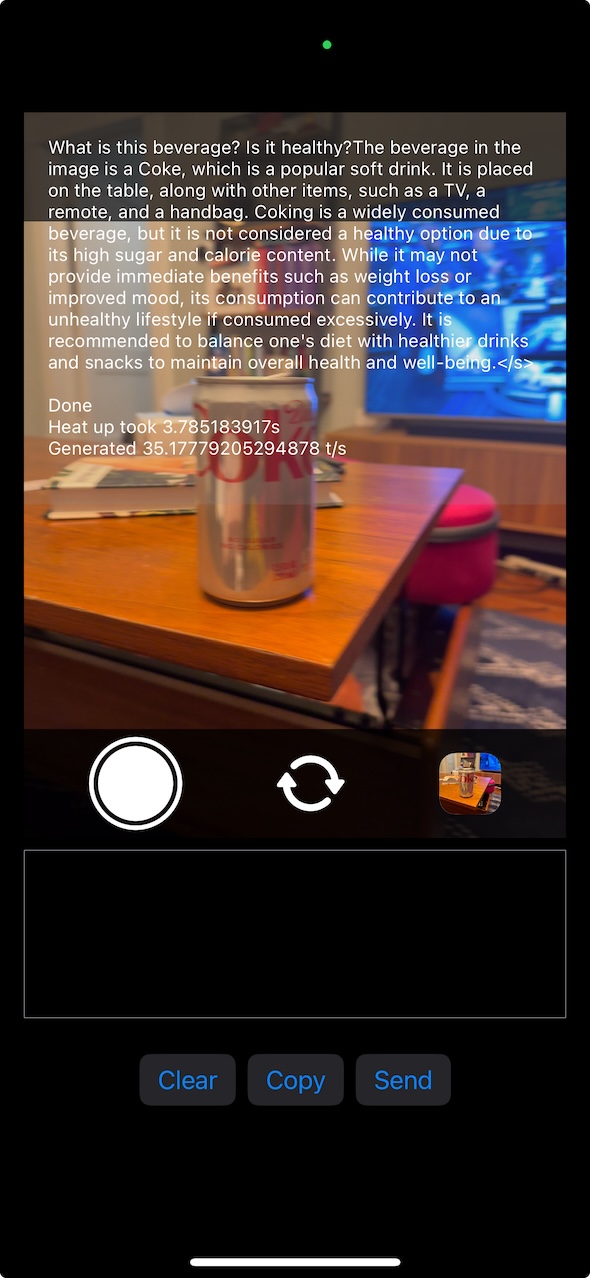
<p>All that pain being said, it honestly “works” better than I expected! The UX, code, etc is a major mess and totally not cleaned up at all! But at this point, i’ve hacked on this off and on over 5+ months and I think it’s worth putting out there. Here’s an example query:</p>

<table>
  <thead>
    <tr>
      <th style="text-align: center"><img src="/images/llava-ios-diet-coke.jpeg" alt="google results" /></th>
      <th> </th>
    </tr>
  </thead>
  <tbody>
    <tr>
      <td style="text-align: center"><em>The UI doesn’t separate prompt and answer, but it ends after the second question</em></td>
      <td> </td>
    </tr>
  </tbody>
</table>

<p>Some of the cool things it does, or that I learned:</p>

<ul>
  <li>Inference is really fast, but loading the image takes some time, so it doesn’t quite feel as fast as it could be</li>
  <li>Running models on device I think is a really really interesting opportunity. For example, if you could run function calling on device, you can embed smarts into your app’s UX without needing internet. Imagine auto filling out an expense report <em>immediately</em> without needing to upload it. I think prompt engineering could go really far here.</li>
  <li>I learned a lesson about how important sampling logic is. Originally, I was re-using the manually rolled out sampling logic from llama.swiftui, but I didn’t handle using the different chat template that TinyLlama uses. It was very interesting to see the difference in how bad it was, and then implementing sampling correctly and seeing how good it was (relatively)</li>
  <li>The battery usage is surprisingly… okay? I haven’t actually measured it, but I will say that compared to the 7B model I tried, it’s way better than I expected.</li>
  <li>llama.cpp is awesome! the API is pretty great, and I learned a ton from integrating it into my project. I think it could very well be used</li>
</ul>

<h1 id="conclusion">Conclusion</h1>

<p>I don’t know if I will continue hacking on this specifically. I learned a lot, and I may incorporate it into some future project, but this was mainly a learning exercise that I kind of stumbled into. I had a vision of a “todo list” app that you <em>never</em> needed to type into. You could just “wear” a camera, and it would watch what you see/do, and add items to your todo list, with appropriate deadlines, automatically - you just need to follow the list! I still think that could be an interesting continuation here, but i’m interested in continuing my learning on both the training and implementation side - specifically I’m curious how to use coreml to run transformer / LLM models, and I <em>really</em> want to see how well function calling could work on device.</p>

<h1 id="appendix---how-did-training-work">Appendix - How did training work?</h1>

<p>I learned a ton training the model too, even if it was mostly done by running the scripts in the LLaVA repo (after pounding my head against my table for hours). To understand how training the smaller model worked, it helps to have a more detailed understanding of how LLaVA works.</p>

<h2 id="clip--llama--llava">CLIP + LLaMA = LLaVA</h2>
<p>I’m not a deep learning or AI expert at all, so this explanation is almost certainly not accurate or precise, but here’s my best summary of how LLaVA training and inference works</p>
<h3 id="inference">Inference</h3>

<p>I want to start with describing inference, as I think describing how inference works makes it easier to understand how training works.</p>

<p>Normally, text-only transformer based LLMs work by converting the input text into tokens, and then converting the tokens to embeddings. Then, the inference code will run the transformer algorithm to produce the output probabilities of each token in the vocab space, and it will select the token based on what strategy is selected.</p>

<p>LLaVA (and other vision + text models) take a fairly straightforward approach to extend how text-only LLMs work. The inference code accepts two types of inputs now – the image (or images) as well as the text of the query. Since an LLM model expects text embeddings as the input before running the transformer algorithm, LLaVA first needs to converts the input Image into text embeddings. It does this by converting the image to <a href="https://github.com/openai/CLIP_">CLIP</a> embeddings, and then running the clip embeddings through a linear layer which maps it into the text embedding space. From here, the inference code works just like the input were just text.</p>

<p>That’s it! I have to say, I appreciate the simplicity, and it makes some intuitive sense. CLIP was trained to produce the most relevant text snippet given an image, so it makes sense that you could translate those embeddings to the embeddings that the LLM understands.</p>

<h3 id="training">Training</h3>

<p>Now that we have a good idea about how inference works, it’s relatively simple to understand how LLaVA was trained. There are two steps to training LLaVA: pretrain and finetuning. Pretraining trains the projection layer that maps the CLIP embeddings to the model’s text embedding space. Finetuning then is training both the projection layer as well as the weights of the LLM. I’m not gonna go too deep here though, I recommend just reading the <a href="https://arxiv.org/pdf/2304.08485">paper</a> .</p>

<p>One important thing is that LLaVA is <em>not</em> an LLM trained from scratch. The LLM weights come from a base model. The initial version of LLaVA was trained with Vicuna used as a starting base, and the smallest available Vicuna model is 7B parameters, and that was the smallest model that the LLaVA authors had trained at the time of the release.</p>

<h2 id="making-llava-smaller">Making LLaVA smaller</h2>

<p>Knowing LLaVA was trained, it should be fairly obvious how to make LLaVA smaller - just use a smaller base model!</p>

<p>Thankfully the LLaVA authors have described how to download the training data they used, as well as have the scripts written to train the model. I chose <a href="https://huggingface.co/TinyLlama/TinyLlama-1.1B-Chat-v1.0">TinyLlama-Chat</a> (which has 1.1B parameters) mainly because when I ran <a href="https://github.com/ggerganov/llama.cpp/tree/master/examples/llama.swiftui">llama.swift</a> (the iOS example in llama.cpp) on my phone, it actually ran fairly quickly with no crashes, so I knew that it should run on my phone after being trained.</p>

<p>Here’s the model <a href="https://drive.usercontent.google.com/download?id=1q_mA9CnxY58f4a1vtYis7TsMAGOraZA4&amp;export=download&amp;authuser=0&amp;confirm=t&amp;uuid=2a4d35b1-580c-4b30-8109-af3421337da0&amp;at=APZUnTUCImK5c06NQ2VnEIix7WHS:1713840631241">weights</a>, and the projection layer <a href="https://drive.usercontent.google.com/download?id=1KgMdwCKb3f1LsQO83e7DTJlh_bznyY5-&amp;export=download&amp;confirm=t&amp;uuid=49f6e0f0-bbbc-4f43-9f65-f42cf19a3014">weights</a>. I have not run the llava eval scripts to see how good it actually is, but in my testing, it worked fairly well.</p>

<h3 id="training-woes">Training woes</h3>
<p>While I was extremely grateful to have a script that essentially automated all the training I needed to do, I ran into many hiccups, draining my motivation for months at a time.</p>

<h4 id="why-did-i-get-this-m3-max">Why did I get this M3 Max?</h4>
<p>Late in 2023, I purchased a fully decked out M3 Max, with the idea that, there’s not going to be an easy way to access 128GB of memory that could be used for deep learning. Naively, I thought that the ecosystem was gradually going to become more and more compatible with M-series macs quickly. I modified the scripts a bit to run on my macbook, and I figured it would be slower. While I was able to get the training loop to “run”, I had to disable the 8bit optimizer, and the training loss graphs just never looked right. I spent way too long trying to get it to work before giving up and just using RunPod. I can’t wait for the day bitsnbytes is compatible with M-series macs.</p>

<h4 id="shuffling-training-data">Shuffling training data</h4>
<p>The training data was 100s of gigabytes. It’s annoying to pay for GPU time when it’s just sitting around waiting for the data needed to train to download. One of the scripts to download the data did not parallelize downloads, so I modified it to do some asyncio python downloads.</p>

<h4 id="training-script-updates">Training script updates</h4>
<p>The training scripts were written in such away that to handle retraining with different base models which was super helpful! But TinyLlama-Chat uses a conversation format that wasn’t supported by default, and it was fairly difficult to verify that the conversation template was used in all the places it needed to be.</p>

<h2 id="training-conclusions">Training Conclusions</h2>
<p>I don’t have a lot to synthesize here, but my takeaways in no particular order:</p>

<ul>
  <li>NVIDIA is king, M-series Macs for deep learning is very niche and unless the model you’re interested is specifically targeting deployment on Apple hardware, it will be very hard to recreate a project’s results.</li>
  <li>training is hard even if you have scripts written for you. expect to need to read most lines of code to make even minor changes to setups.</li>
  <li>RunPod is fantastic - I don’t get any revenue from them I just want to praise them for lots of availability, easy to get started.</li>
  <li>Small models train faster than you think</li>
  <li>A huge shoutout to all models that actually publish their datasets and provide scripts to integrate them to reproduce models!</li>
</ul>

<p>[^1] Sure, you could just use ChatGPT’s exceptional mobile app, but that’s not very fun.</p>]]></content><author><name></name></author><summary type="html"><![CDATA[I got LLaVA to run on iOS by re-running training using TinyLlama as the base model and llama.cpp for inference. The UI is janky, but I learned a lot getting it to run on device. While there are a lot of projects that run various LLMs on mobile, I think there are only a few that allow images as an input (and I think there weren’t any when I started on this project). Check it out on GitHub. A huge shout out to the author of the llava example in the llama.cpp project, as well as the author of the llama.swiftui (and of course, llama.cpp in general).]]></summary></entry><entry><title type="html">Understanding is not binary because problems are multi-dimensional</title><link href="prashanth.world/understanding/" rel="alternate" type="text/html" title="Understanding is not binary because problems are multi-dimensional" /><published>2023-07-07T00:00:00+00:00</published><updated>2023-07-07T00:00:00+00:00</updated><id>prashanth.world/understanding</id><content type="html" xml:base="prashanth.world/understanding/"><![CDATA[<p>In the past, I’ve been guilty of assuming that I understand someone’s problem. “Got it, what about if you….” I’ve said, cutting the other person off mid-sentence while silently congratulating myself for saving the other person from the burden of speaking their mind. I cringe when I think about times when I’ve done this, and I try not to do this any more.</p>

<p>Now, when I’m trying to make sure I understand a problem or an ask from someone, I never feel like I understand it completely. I’ve come to see there’s no such thing as “getting it”, or perfect empathy. Understanding is not “Yes I get it” or “No I don’t get it” (this is pretty obvious). And there are many different ways to understand what “it” is (less obvious, but somewhat so). Understanding is continuous, not binary because problem spaces are multi-dimensional. Thinking about the dimensions of a problem-space and degrees of understanding is a good way to pause and reflect my own certainty. It’s also a useful way for me to structure my understanding of someone’s perspective, and informs how I might advocate for my own position more effectively.</p>

<h2 id="the-infamous-hn-dropbox-comment">The infamous HN Dropbox comment</h2>

<p>When Dropbox <a href="https://news.ycombinator.com/item?id=8863">launched on HN</a>, the top comment is well known as an iconic HN forum response. The comment has a bit worse reputation for ‘not getting it’ than the original text of the comment, but I think it shows the perils of having a binary understanding of a multi-dimensional problem. The comment’s main issues with Dropbox are</p>

<ol>
  <li>This is already solvable using FTP + Version Control</li>
  <li>The solution is also distributed to end users by default</li>
  <li>Network file syncing doesn’t work for a lot of cases which is why you can’t replace a USB drive.</li>
</ol>

<p>This is a great example of understanding the problem <em>along a specific dimension</em>. It’s actually a <em>very</em> insightful comment - existing solutions that are <em>already distributed</em> to end users is a very difficult dynamic to overcome (just ask Slack about the power of distribution as a competitor to M$FT Teams). There are kernels of serious questions embedded in this comment, and the person raising these questions is at least somewhat well informed about solutions in the space of file syncing. The point about USB drives is also very sharp - at the time, cellular data was definitely not widely accessible, and WiFi was (more of) a crapshoot. If I were thinking about whether the commenter has a working understanding of the problem space in file syncing, I’d lean towards “Yeah” if forced to pick between Y/N.</p>

<h2 id="problem-spaces-are-multi-dimensional-and-understanding-happens-along-each-dimension">Problem spaces are multi-dimensional, and understanding happens along each dimension</h2>

<p>Obviously, however, understanding is not a yes or no (which should be obvious given how things ended up for <a href="https://www.google.com/finance/quote/DBX:NASDAQ">DBX</a>). Specifically in this case, I’d say the commenter <em>sorta</em> understood the dynamics of file syncing solutions, but not completely. Here are some ways aspects of file syncing I’d say the first comment didn’t fully understand.</p>

<ol>
  <li>Even combining the tools mentioned doesn’t really replicate the same dynamics that Dropbox introduced. While you could access the files via an FTP server, they wouldn’t automatically be synced between the devices (unless they all ran the Linux / syncing solution they mentioned)</li>
  <li>As drew <a href="https://news.ycombinator.com/item?id=9272">mentions</a>, the issues with file sync on the windows weren’t really solved</li>
  <li>The “Throw away your USB drive” language was specifically around syncing files during periods of intermittent connectivity across your own machines, not between shared devices.</li>
</ol>

<p>I’m not pointing these shortcomings out just to dunk on the original commenter, but to show that even someone who is well informed on file syncing may not have full understanding of how well the existing solutions worked for users. (If it’s not clear by now, I actually thought their feedback was very well communicated.)</p>

<p>Zooming out even more, file syncing itself is a solution to human problems - the problem space is not file syncing software. Why do people even need to transfer files between computers? There are tons of reasons - collaboration, backups, file versioning, users with multiple devices, and others. And what about the current state of how people use and interact with files at all? The state of the art technology at the time? Each one of these are a dimension to the problem space, and every solution be evaluated along these various dimensions differently. The original comment’s solution fits well along some of these dimensions, but doesn’t fit well along others. Problems spaces are multi- dimensional, and one’s understanding of a problem space can be evaluated along all of the various dimensions in the space.</p>

<p>Examining Dropbox a bit closer, the dimensions of the problem space they really understood were:</p>
<ol>
  <li>Where do the majority of users live? Focusing on Windows and Mac versus technical users.</li>
  <li>How do they use/interact with files? - Users used Windows Explorer or Mac Finder to interact with files. They made software that let them use the tools they already know how to use (no need to understand FTP). People also never thought about having “multiple copies” of a file - they thought of “the document”, and wanted it to be available no matter where they worked.</li>
  <li>Collaboration on files sucked - emailing files, versioning files, collaborating on edits was just impossible.</li>
  <li>Passive backups sucked - they either required manual checkpoints, or involved a ton of bandwidth to sync whole files instead of optimizing for continuous syncing</li>
  <li>USB drives just sucked too. They got lost, had outdated copies of files, ran out of storage so you’d end up with multiple of them (exacerbating the issues)</li>
</ol>

<p>Their understanding of the problem space was much deeper along many of it’s facets. And it’s important to point out also that not every dimension in the space is equally weighted. They built a product based on understanding the important dimensions of the problem space that lived <em>where their target users lived</em> and around what they were <em>trying</em> to do. They also benefited from various trends in technology which I think also shows a deeper understanding of the dynamics in technology and industry. Wireless networks were becoming much more reliable, and the growth in cloud software / software that worked seamlessly via the internet changed users expectations to align with how Dropbox worked. One could even argue Dropbox was one of the driving forces of those changing user expectations.</p>

<h2 id="structured-empathy-and-the-follow-up-to-the-infamous-hn-comment">Structured empathy, and the follow up to the infamous HN comment</h2>

<p>I don’t know how insightful of an observation this is, but I have found it useful when trying to probe my own certainty. In situations where I feel very certain about The Right Answer™️, but others seem to be doubtful or uncertain, I try to identify the dimensions of the problem that I have more understanding of, and also look for dimensions I am not accounting for. Maybe I do understand the different facets, but maybe I’m weighing one dimension much more importantly than it should be weighed.</p>

<p>Conversely, in trying to explain and advocate my own opinion to others, I can listen to someone, evaluate their perspective the in a similar fashion. By listening and asking questions, I can see what dimensions of the problem they aren’t considering, what dimensions they are weighing more than I am, and explain the differences in a more structured way.</p>

<p>I’d feel remiss if I didn’t highlight the followup <a href="https://news.ycombinator.com/item?id=9479">comment</a> replying to Drew. The reputation this thread has for demonstrating classic HN cynicism is overblown in my view. In response to some of the points Drew raised, the commenter was really positive, energizing, and acknowledged the shortcomings of their original comment. While there is clearly some skepticism even still, I think the thread is actually an exemplar of expressing one’s understanding of a problem, debating and exploring the problem space, and learning from different perspectives. Maybe I’m reading too much into it, or maybe there’s some context I’m missing, but I find the whole thread very wholesome.</p>

<h3 id="random-thoughts-responses-to-comments-and-edits">Random thoughts, responses to comments, and edits</h3>

<h4 id="thoughts">Thoughts</h4>
<ul>
  <li>Originally I had planned to make some sort of AI reference around neural networks, tensors, weights and biases, but it just felt too forced.</li>
  <li>It was hard to come up with an example that wasn’t too contrived, too specific, or too long-winded. The Dropbox comment thread is well known, so I thought it was best to choose a public example that wouldn’t require a lot of explanation, versus a personal or hypothetical example that might require a lot of context to convey the point.</li>
</ul>]]></content><author><name></name></author><summary type="html"><![CDATA[In the past, I’ve been guilty of assuming that I understand someone’s problem. “Got it, what about if you….” I’ve said, cutting the other person off mid-sentence while silently congratulating myself for saving the other person from the burden of speaking their mind. I cringe when I think about times when I’ve done this, and I try not to do this any more.]]></summary></entry><entry><title type="html">🍳 Vegetarian Bolognese</title><link href="prashanth.world/vegetarian-bolognese/" rel="alternate" type="text/html" title="🍳 Vegetarian Bolognese" /><published>2020-11-29T00:00:00+00:00</published><updated>2020-11-29T00:00:00+00:00</updated><id>prashanth.world/vegetarian-bolognese</id><content type="html" xml:base="prashanth.world/vegetarian-bolognese/"><![CDATA[<p>A simple mushroom based bolognese, with lots of depth.</p>

<ol>
  <li>Toast fennel and pepper flakes until fragrant. Add half of the toasted spices with half the mushrooms and pulse in a food processor. Repeat with the second half.</li>
  <li>Add some oil from the garlic confit or olive oil to a large pot or dutch oven, and add the mushrooms. Fry off until most of the liquid is cooked out. Add oil when things look a bit too dry.</li>
  <li>Add the onions, carrots, cook until softened.</li>
  <li>Add tomatopaste and garlic dice if you want. Cook for a few mins until mellowed out.</li>
  <li>Deglaze with red wine, and then add the milk, soy sauce, walnuts and stock if you want to.  Add bay leaf and cook down for 30 minutes, stirring to make sure it doesn’t burn on bottom.</li>
  <li>Add in the cheese and you’re done</li>
  <li>Cook pasta and toss with sauce, making sure to use pasta water to thin the sauce to the right consistency.</li>
</ol>

<h2 id="my-notes">My notes</h2>
<ol>
  <li>Definitely don’t make this too often, you’ll get sick of it.</li>
  <li>Fennel seeds are amazing. I feel like this recipe is extremely boring, but the fennel seeds make it magical.</li>
  <li>I’m not totally sold on the walnuts in this recipe. I think the idea is to give some texture, but when they’re raw, they just taste like raw walnuts. And when I toast them, I always end up with some slightly burnt pieces - which is okay for something like a banana bread, but it’s a bit strong in this recipe.</li>
</ol>

<h2 id="footnotes">Footnotes</h2>
<ol>
  <li>Cribbed from: https://dishingouthealth.com/vegan-bolognese/</li>
</ol>]]></content><author><name></name></author><summary type="html"><![CDATA[A simple mushroom based bolognese, with lots of depth.]]></summary></entry><entry><title type="html">🍳 Adam Ragusea’s Roasted Tomato Sauce</title><link href="prashanth.world/roasted-tomato-sauce/" rel="alternate" type="text/html" title="🍳 Adam Ragusea’s Roasted Tomato Sauce" /><published>2020-06-08T00:00:00+00:00</published><updated>2020-06-08T00:00:00+00:00</updated><id>prashanth.world/roasted-tomato-sauce</id><content type="html" xml:base="prashanth.world/roasted-tomato-sauce/"><![CDATA[<p>Adam Ragusea’s Roasted Tomato Sauce is a super simple and quick recipe to make a tomato sauce that takes no effort at all. The only thing to watch out for is burning yourself. As someone who rarely uses a kitchen towel to grasp pans, this one has burned me a couple times (literally).</p>

<ol>
  <li>Preheat the oven to 450 degrees (convection works better according to Adam).</li>
  <li>Cut the tomatoes in half and put them on a stainless steel pan skin side up (cut side down).</li>
  <li>Drizzle the tomatoes with olive oil and put them in the oven for at least 20 mins, until the tomato juices cook away.</li>
  <li>In the mean time, dice up the cloves of garlic and shallots.</li>
  <li>Once the tomatoes are almost done and the juices are cooked away, add the garlic and shallot and keep in the oven for another 3-5 mins.</li>
  <li>Take the tomatoes out and remove the burnt skins of the tomatoes. Use a wooden spatula to mash cooked tomates to deglaze the pan.</li>
  <li>At this point, I’d taste the sauce. Often I find it’s a bit too acidic at this point, so I add butter half a tablespoon at a time, usually two tbsp total, over medium low heat. Tasting is key.</li>
  <li>Don’t forget to add salt and pepper.</li>
</ol>

<h2 id="my-notes">My notes</h2>
<ol>
  <li>This is a really good sauce, but because it’s so simple it’s important to finish the sauce with the butter, tasting it, keeping it moving, cooking it down if it needs to be cooked down.</li>
  <li>The tomatoes in the oven will look almost on the edge of burnt. This is good and how you develop the sauce into something tasty.</li>
  <li>When cooking the pasta, make sure you add a little pasta water to the sauce so it’ll bind to the pasta better.</li>
  <li>Don’t limit yourself to plain old pasta, this is a fantastic sauce for a ravioli that’s filled with a rich filling like ricotta and mushrooms.</li>
</ol>

<h2 id="footnotes">Footnotes</h2>
<ol>
  <li>Adam Ragusea’s video is here: https://www.youtube.com/watch?v=KhlquGe54bQ</li>
  <li>He’s a super opinionated, but well reasoning youtube cook. His recipes are really straightforward to follow, but leave a lot of room for your own customization.</li>
</ol>]]></content><author><name></name></author><summary type="html"><![CDATA[Adam Ragusea’s Roasted Tomato Sauce is a super simple and quick recipe to make a tomato sauce that takes no effort at all. The only thing to watch out for is burning yourself. As someone who rarely uses a kitchen towel to grasp pans, this one has burned me a couple times (literally).]]></summary></entry><entry><title type="html">🍳 Jacques Pépin’s Chili con ‘carne’</title><link href="prashanth.world/chili-con-carne/" rel="alternate" type="text/html" title="🍳 Jacques Pépin’s Chili con ‘carne’" /><published>2020-05-26T00:00:00+00:00</published><updated>2020-05-26T00:00:00+00:00</updated><id>prashanth.world/chili-con-carne</id><content type="html" xml:base="prashanth.world/chili-con-carne/"><![CDATA[<p>Jacque Pépin’s Chili con Carne minus the carne. This recipe’s almost comically easy.</p>

<ol>
  <li>Blitz the mushrooms in a food processor and throw them in the Instant pot on sauté mode. Cook out all the liquid from the mushrooms.</li>
  <li>While the mushrooms are cooking out, dice the onion (you can just throw it in the same food processor), garlic and jalapeno. Peel and cut the carrots</li>
  <li>Once the mushrooms are done, throw the onions in there with some olive oil. Let them cook out for a little (3 mins or so)</li>
  <li>Now just throw the rest of the ingredients in the pot, stir, and cook in the instant pot on high pressure mode for 20 minutes.</li>
  <li>Once the 20 mins are done, let it release on low pressure - see notes from here</li>
</ol>

<h2 id="my-notes">My notes</h2>
<ol>
  <li>At the end, if it’s too watery, try cooking it down a bit more on saute mode. You can also use an immersion blender to blend some of the beans to make it richer</li>
  <li>Play around with the spice amounts. these are mostly guidelines.</li>
</ol>

<h2 id="footnotes">Footnotes</h2>
<ol>
  <li>You can watch Jacques here: https://youtu.be/G3XYQ6jCRRU?t=248, but since I made it vegetarian, it’s not quite the same.</li>
  <li>Recipe on kqued: https://www.kqed.org/w/morefastfoodmyway/episode217.html</li>
</ol>]]></content><author><name></name></author><summary type="html"><![CDATA[Jacque Pépin’s Chili con Carne minus the carne. This recipe’s almost comically easy.]]></summary></entry><entry><title type="html">🍳 Bon Appétit’s Pasta e Ceci</title><link href="prashanth.world/pasta-e-ceci/" rel="alternate" type="text/html" title="🍳 Bon Appétit’s Pasta e Ceci" /><published>2020-04-24T00:00:00+00:00</published><updated>2020-04-24T00:00:00+00:00</updated><id>prashanth.world/pasta-e-ceci</id><content type="html" xml:base="prashanth.world/pasta-e-ceci/"><![CDATA[<p>I stole this from Bon Appetit. Super delicious, comforting, very forgiving, with a silky texture that is unlike other pasta recipes I’ve made (probably due to the crushed chickpeas).</p>

<ol>
  <li>Dice onion, garlic. Rinse (well) and Drain Chick Peas.</li>
  <li>Saute Onion in large saucepan until translucent (about 10 minutes). While Onions are cooking, crush canned tomatoes by hand.</li>
  <li>Add Garlic and let cook for 2-3 minutes (just starting to brown).</li>
  <li>Add Chickpeas, rosemary and pepper flakes. Let cook for a minute or so, enough for the chickpeas to start to cook. Crush about 1/3 of the chickpeas against the side of the pot.</li>
  <li>Add the crushed tomatos and let them cook down.</li>
  <li>Once they’ve cooked down, add about 4 cups of water. Add the Pasta to the pot as well. Let it cook for 13 ish mintues or so. Add some salt. Let it cook down and the pasta will cook too. You can also fish out the rosemary stem</li>
  <li>Once the pasta is cooked, remove from heat. Add the parmesan or pecorino gradually, making sure that the cheese doesn’t clump.</li>
  <li>Serve!</li>
</ol>

<h2 id="my-notes">My notes</h2>
<ol>
  <li>I am not a big fan of the big rosemary leaves hiding in the pasta. I think it might be worth it to try adding the rosemary after adding the crushed tomatoes and/or fishing them out much earlier to try to catch some of them.</li>
  <li>I think it’d be pretty cool to add some crispy chickpeas at the end. Kind of like little chickpea croutons.</li>
  <li>I often serve this with a dollop of high quality ricotta, drizzled with good olive oil and add some coarse salt on the ricotta. Adds some creaminess that amplifies the silkiness of the starchy broth/sauce.</li>
</ol>

<h2 id="footnotes">Footnotes</h2>
<ol>
  <li>Here’s where I stole it frome: https://www.bonappetit.com/recipe/brothy-pasta-with-chickpeas</li>
</ol>]]></content><author><name></name></author><summary type="html"><![CDATA[I stole this from Bon Appetit. Super delicious, comforting, very forgiving, with a silky texture that is unlike other pasta recipes I’ve made (probably due to the crushed chickpeas).]]></summary></entry><entry><title type="html">Googling for answers costs you time</title><link href="prashanth.world/seo-ruining-programming-help/" rel="alternate" type="text/html" title="Googling for answers costs you time" /><published>2020-03-11T00:00:00+00:00</published><updated>2020-03-11T00:00:00+00:00</updated><id>prashanth.world/seo-ruining-programming-help</id><content type="html" xml:base="prashanth.world/seo-ruining-programming-help/"><![CDATA[<p>When I’m learning a new language, I tend to take a very dumb approach (and I don’t mean that in some enlightened way). I’ll usually try out a tutorial or two, but if the language is similar to another language that I know, I’ll basically just start coding without investing a lot of time learning the language features. This leads me to often googling how to do extremely basic things. Stuff like ‘python iterate over dict’. ‘javascript get object keys’. ‘elixir keyword list to map’. In the past, I’ve felt extremely adept at finding exactly what I need, but recently I’ve noticed that it’s been taking me longer and longer to really find the answers I’m looking for.</p>

<p>For example, looking at the results on Google for <a href="https://www.google.com/search?hl=en&amp;q=python%20iterate%20over%20dictionary">‘python iterate over dict’</a>, I see the following results</p>

<table>
  <thead>
    <tr>
      <th style="text-align: center"><img src="/images/google_python_dict_results.png" alt="google results" /></th>
    </tr>
  </thead>
  <tbody>
    <tr>
      <td style="text-align: center"><em>Seems reasonable</em></td>
    </tr>
  </tbody>
</table>

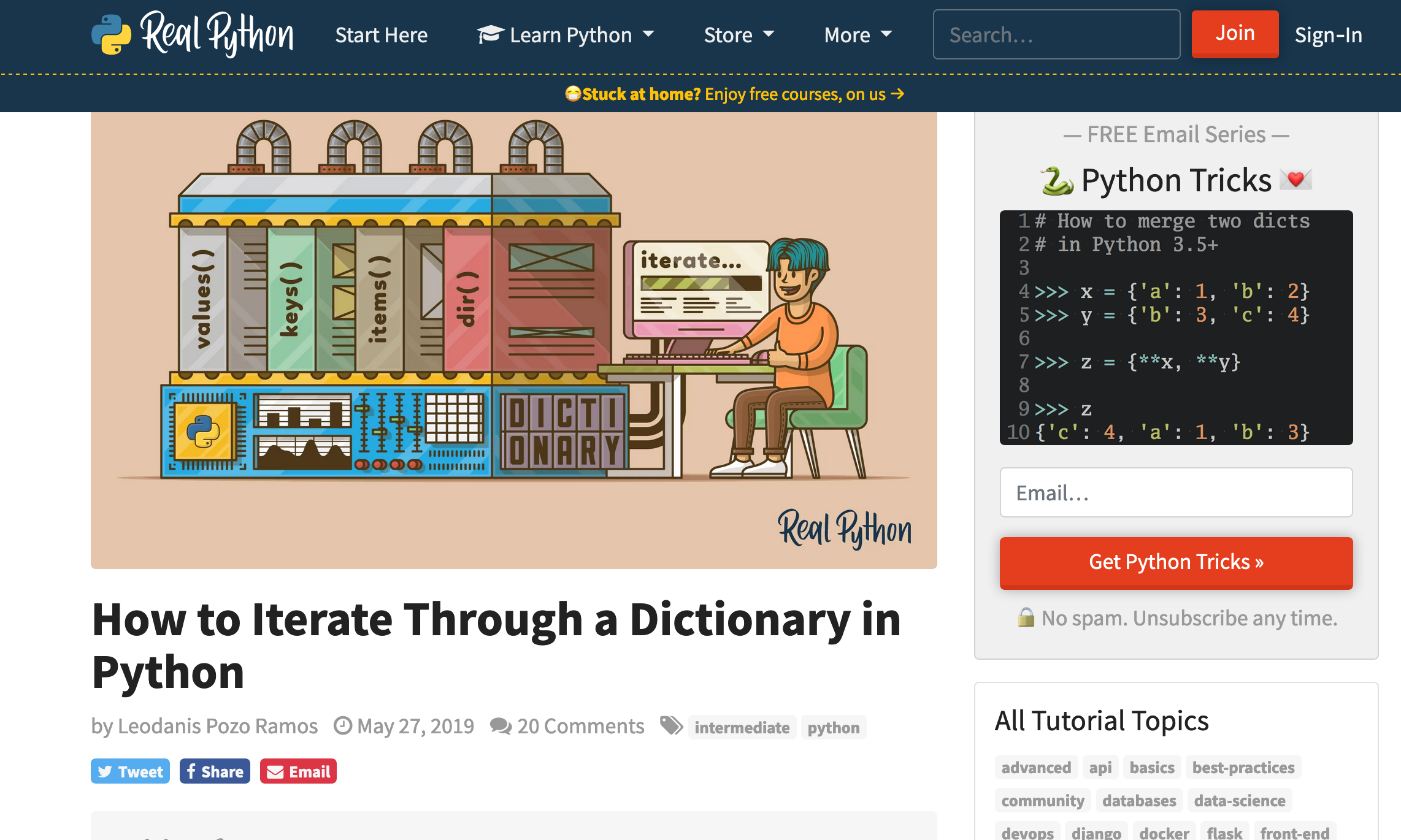
<p>Notice that StackOverflow is the third response. I am not sure what realpython.com is, but clicking on that <a href="https://realpython.com/iterate-through-dictionary-python/">link</a> shows the following page</p>

<table>
  <thead>
    <tr>
      <th style="text-align: center"><img src="/images/real_python_image_1.png" alt="google results" /></th>
    </tr>
  </thead>
  <tbody>
    <tr>
      <td style="text-align: center"><em>a whole lot of nothing</em></td>
    </tr>
  </tbody>
</table>

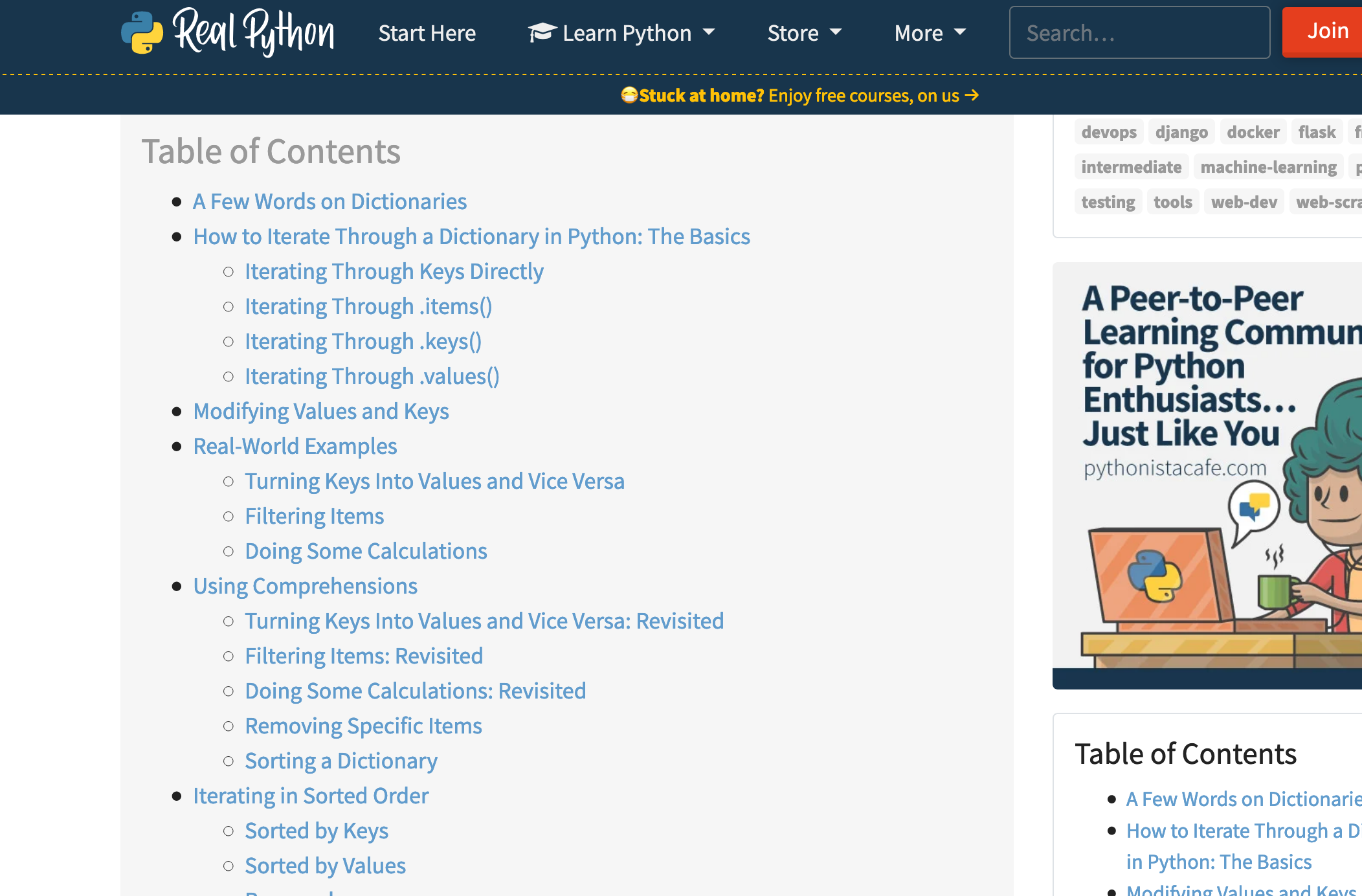
<p>Notice that there’s literally no content visible. Lets scroll down one page</p>

<table>
  <thead>
    <tr>
      <th style="text-align: center"><img src="/images/real_python_TOC.png" alt="google results" /></th>
    </tr>
  </thead>
  <tbody>
    <tr>
      <td style="text-align: center"><em>…so…much…nonsense</em></td>
    </tr>
  </tbody>
</table>

<p>Hmm still no content. Well there’s a table of contents, but no actual content. Scrolling down to the content, it goes on and on and on and on about why dictionaries are important, what you can use dictionaries for, what are valid keys for dictionaries… The title of the post is quite literally ‘How to iterate through a dictionary in python’, but it takes NINE PAGE DOWN keystrokes just to get to the <em>section</em> called ‘the basics’.</p>

<p>How is this the number one link on Google? Specifically when looking up how to do basic things in Python, I get more and more of this filler content. I think it’s because Python attracts a lot of bootcamp and college students, people who <em>would pay</em> for training in order to learn Python. I remember one of the arguments I heard about why we were adopting Python at a previous company I worked for that was a mostly Rails (and some Elixir) shop was that Python was very easy to learn and search for on Google. I don’t think that’s true.</p>

<p>I don’t <em>know</em> if this is actually getting worse over time, but I’m noticing filler content more and more. It also seems to happen whenever searching for anything cooking related. For example: <a href="https://www.google.com/search?hl=en&amp;q=1%20cup%20flour%20to%20grams">converting 1 cup flour to grams</a>. To start, this search has a featured snippet that’s just wrong. But when you click into a few of the other links, the answer is obscured in some way (burried in a list of charts, answer is not made very apparent). Another cooking example - <a href="https://thesaltymarshmallow.com/homemade-belgian-waffle-recipe/">recipe sites</a>. It’s not a recipe unless there’s some excruciatingly long preamble, asking me to scroll at least 5 pages down before the actual recipe is available.</p>

<p>And I know the reason - ads and SEO. In order to be a good candidate for any ad revenue, you need enough ‘content’ before you can actually make any money. All this pointless content is posted just so people will spend longer on a site, which makes things more appealing for both ads and SEO. Except… well SEO should be optimising for content people actually want to see, and instead it’s optimizing for the amount of time spent on a site, regardless of whether the time on the site was actually productive.</p>

<p>But to me, the user, it feels like I’m paying for my answers with my time pointlessly scrolling around the page to find the answer I came to the site for. I can’t stand it; I feel like I am being duped, misled, being taken for a ride, just so I know how to make pancakes, or how to do a simple thing in common programming language. It feels like watching Dragon Ball Z back in the 00’s. Watching 5 episodes week after week, just for five minutes of time to elapse in the show.</p>]]></content><author><name></name></author><summary type="html"><![CDATA[When I’m learning a new language, I tend to take a very dumb approach (and I don’t mean that in some enlightened way). I’ll usually try out a tutorial or two, but if the language is similar to another language that I know, I’ll basically just start coding without investing a lot of time learning the language features. This leads me to often googling how to do extremely basic things. Stuff like ‘python iterate over dict’. ‘javascript get object keys’. ‘elixir keyword list to map’. In the past, I’ve felt extremely adept at finding exactly what I need, but recently I’ve noticed that it’s been taking me longer and longer to really find the answers I’m looking for.]]></summary></entry></feed>